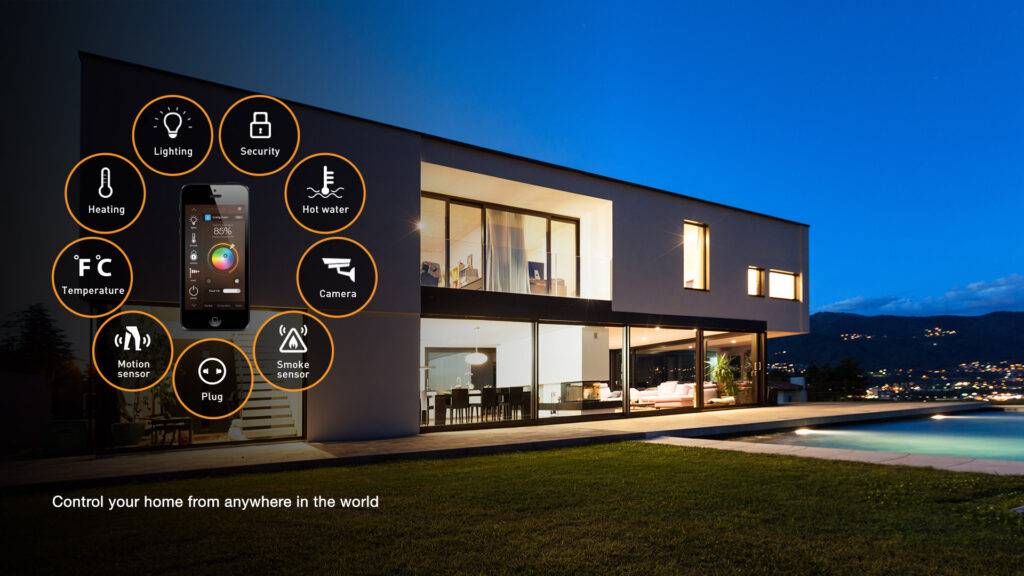
A smart home often begins with a single connected light bulb or plug. Before long, however, you may have several apps installed, multiple user accounts to manage, and devices that refuse to communicate with one another.
A smart-home hub helps solve that problem. It provides a central platform for controlling compatible devices, creating automated routines, and giving other members of your household a simpler way to use the technology.
The right choice depends less on which hub has the longest specification sheet and more on which ecosystem already fits your life. An iPhone household may prefer Apple Home, while someone using Ring cameras and Alexa speakers will usually find an Amazon hub more convenient. Enthusiasts who value privacy and customization may be happier with Home Assistant.
Smart-Home Hubs at a Glance
| Hub | Recommended For | Key Connectivity | Important Consideration |
|---|---|---|---|
| Amazon Echo Hub | Alexa and Ring households | Wi-Fi, Bluetooth, Zigbee, Matter, Thread, and Sidewalk | Some security and Alexa+ features may require subscriptions |
| Apple HomePod mini | iPhone and Apple Home users | Wi-Fi, Bluetooth, Matter, and Thread | Designed primarily for the Apple ecosystem |
| Google Nest Hub (2nd Gen) | Google Home and Android users | Wi-Fi, Bluetooth, Matter, and Thread | No built-in camera for video calls |
| Home Assistant Green | Privacy-conscious users and enthusiasts | Ethernet, with optional Zigbee and Thread hardware | Requires more setup and technical involvement |
What Does a Smart-Home Hub Actually Do?
A hub acts as the coordinator for your connected devices. Instead of opening one app for the lights, another for the thermostat, and a third for the doorbell, you can bring compatible products into a single platform.
The hub can also run automations. For example, a “Good Night” routine might lock the doors, turn off downstairs lights, lower the thermostat, and activate selected security sensors. A motion detector in the hallway could turn on a dim light after sunset without anyone touching a switch.
Some hubs support local control, which allows certain devices and automations to continue working when the internet connection is unavailable. Cloud-based features such as remote access, voice services, notifications, and video storage may still require an internet connection.
Understanding Matter, Thread, Zigbee, and Wi-Fi
Compatibility language can make smart-home shopping unnecessarily confusing. Fortunately, you do not need to become a networking expert to make a sensible decision.
- Wi-Fi devices connect through your existing wireless network. They are easy to install but can add congestion when used in large numbers.
- Zigbee is a low-power mesh technology commonly used by sensors, bulbs, buttons, and locks. It requires a compatible coordinator or hub.
- Thread is another low-power mesh networking technology. Thread devices require a Thread border router to connect with the rest of your home network.
- Matter is a compatibility standard that allows supported products from different brands to work across participating smart-home platforms.
Matter can reduce ecosystem lock-in, but the Matter logo does not guarantee that every feature will appear in every app. Before purchasing a lock, camera, sensor, or appliance, check whether its specific functions are supported by your chosen platform.
Amazon Echo Hub: A Practical Control Panel for Alexa Homes
The Amazon Echo Hub is designed for people who want a visible, household-friendly smart-home dashboard. Its touchscreen can display lights, locks, thermostats, routines, and compatible camera feeds without requiring someone to find a phone.
It supports a broad collection of technologies, including Wi-Fi, Bluetooth, Zigbee, Matter, Thread, and Amazon Sidewalk. That makes it particularly attractive for homes containing a mixture of Alexa-compatible products.
The wall-mountable design works well near an entrance, in a kitchen, or in another shared area. A tabletop stand and compatible Power-over-Ethernet installation accessories are available separately.
Choose the Echo Hub if: you already use Alexa, Ring, Blink, or several Zigbee devices and want a dedicated touchscreen for everyday control.
Think twice if: your household prefers Siri or Google Home, or you want to avoid features that may be tied to optional subscriptions.
Apple HomePod Mini: The Natural Choice for Apple Households
The Apple HomePod mini combines a compact smart speaker with Apple Home hub functionality. Once configured, it can support remote accessory control, household automations, Siri commands, and compatible Matter devices.
HomePod mini includes Thread networking technology and can serve as the required home hub for supported Thread-based Matter accessories. It also contains temperature and humidity sensors, which can be used with compatible Home automations.
Apple’s biggest advantage is integration. Lights, locks, cameras, and scenes can be controlled through the Home app on an iPhone, iPad, Mac, Apple Watch, or Apple TV. The experience is generally straightforward when every household member already uses Apple devices.
Choose the HomePod mini if: your home primarily uses iPhones and you want a compact combination of smart speaker, Siri assistant, and automation hub.
Think twice if: household members use several different mobile platforms or you rely heavily on devices designed exclusively for Alexa or Google Home.
Google Nest Hub: Visual Control Without a Bedroom Camera
The Google Nest Hub (2nd Gen) provides a seven-inch display for controlling compatible devices, viewing cameras, following recipes, playing media, and managing daily information.
Google states that the second-generation Nest Hub can work as a Matter hub and includes a Thread border router. This makes it a convenient starting point for shoppers who want to add Matter and Thread products over time.
Unlike some larger smart displays, the second-generation Nest Hub does not include a camera. That can be a disadvantage if you want video calling, but it may make the device more comfortable to place in a bedroom.
Choose the Nest Hub if: you use Google Home, Google services, Nest cameras, or Android devices and want simple touchscreen and voice control.
Think twice if: you require video calling or have already built most of your home around Apple Home or Alexa.
Home Assistant Green: Greater Control and Better Local Privacy
The Home Assistant Green takes a different approach. Rather than centering the experience on a commercial voice assistant, it runs the open-source Home Assistant platform on dedicated hardware.
Home Assistant is known for extensive integrations, detailed dashboards, powerful automations, and local data control. The Green model includes a quad-core processor, 4GB of memory, 32GB of storage, Gigabit Ethernet, and two USB ports.
It does not include built-in Zigbee or Thread radios. Direct support for those networks requires additional hardware, such as the Home Assistant Connect ZBT-2. Buyers should check the current status of Thread support before purchasing accessories specifically for that purpose.
Home Assistant Green offers far more customization than mainstream smart displays, but that flexibility comes with a learning curve. Creating dashboards, troubleshooting integrations, and maintaining more advanced automations can require patience.
Choose Home Assistant Green if: you value local control, privacy, customization, or compatibility across a wide variety of brands.
Think twice if: you want the simplest possible plug-and-play experience for nontechnical household members.
Five Questions to Ask Before Buying
- Which phones does your household use? Apple Home is most natural for iPhone users, while Google Home and Alexa offer broad support across mobile platforms.
- What devices do you already own? Check your cameras, locks, thermostat, lights, and sensors before committing to a hub.
- Do you need Zigbee or Thread? Never assume a hub supports a protocol simply because it supports Matter.
- How important is local control? If privacy and offline operation are priorities, investigate which automations run locally.
- Do you want a screen? A shared display can be easier for guests and family members than a phone-only system.
Frequently Asked Questions
Do I need a smart-home hub for every connected device?
No. Many Wi-Fi products can operate through their own apps. A hub becomes more valuable when you want centralized control, remote access, voice commands, or automations involving products from multiple categories.
Does Matter eliminate the need for a hub?
Not necessarily. Matter devices still require a compatible Matter controller, and Thread-based products require a Thread border router. Several smart speakers, displays, streaming devices, and dedicated hubs can perform these roles.
Can I use more than one smart-home platform?
Yes. Matter’s multi-admin capabilities can allow compatible products to appear in more than one ecosystem. However, features and automation options can vary between platforms.
Will a smart home continue working without the internet?
Some locally controlled devices and routines may continue operating, but cloud services, remote access, video storage, and many voice-assistant features can become unavailable. Offline behavior depends on the hub and individual accessories.
Final Recommendation
For most buyers, the smartest decision is to follow the ecosystem already used by the household. Choose the Echo Hub for an Alexa-centered home, HomePod mini for Apple Home, or the Nest Hub for Google Home.
Home Assistant Green is the stronger choice for users who want advanced automation, broader customization, and greater control over where their data is processed. It demands more involvement, but it can grow into a remarkably capable system.
Whichever platform you choose, start with one practical automation rather than filling the house with gadgets. A reliable entry light, thermostat schedule, or nighttime security routine will teach you more about smart-home technology than a shopping cart full of disconnected devices.
About Author